2.3 Why Is Memory Split into Layers?
Memory occupies a large place in what a computer does. In the previous chapter, we divided chips into chips that compute (system semiconductors) and chips that remember (memory semiconductors), and in the previous section we met them as the CPU and memory. But memory doesn’t exist only in “memory.” As we saw in the previous section, there is memory space inside the CPU as well. Why isn’t all memory gathered in one place?
Recall 3 + 5 from the previous section. In Figure 2-5, the CPU couldn’t add 3 and 5 while they sat in memory; it could add them only after a LOAD instruction brought them into the memory space right next to where computation happens. But that space isn’t very large, because the limited area inside the CPU must be shared between the parts that compute and the parts that remember. So only the data needed for the computation at hand is kept close to where computation happens, and the rest is kept far from it, in memory.
People don’t retrieve everything they remember in the same way, either. Some things are in your head right now, ready to use; some you saw a moment ago and can recall quickly. Some are old memories you have to work to recall, and some aren’t in your head at all but written in a notebook you have to look up. Computers are the same. There is one more layer between the space right next to computation and memory, and one more layer behind memory.
In this way, a computer’s memory is divided broadly into four layers: registers, cache, memory, and storage. Registers and cache are inside the CPU; memory and storage are separate components outside it. Memory is the DRAM we saw in the previous section, and the typical storage device is the SSD (Solid State Drive). Figure 2-6 shows what an SSD actually looks like.
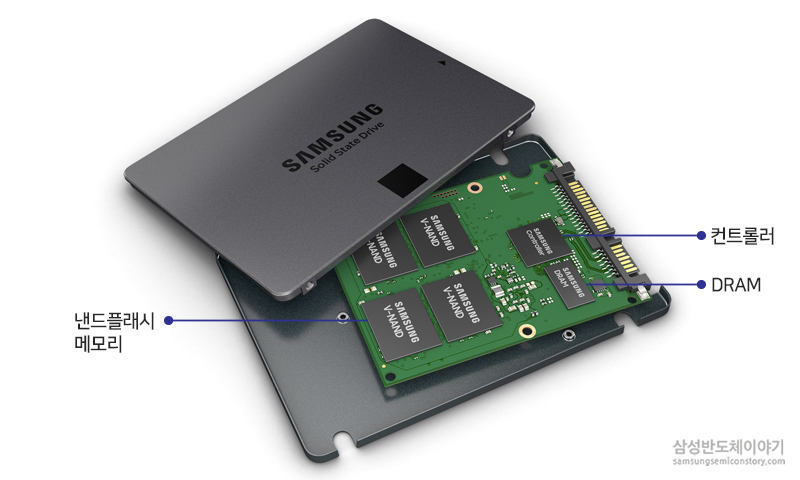
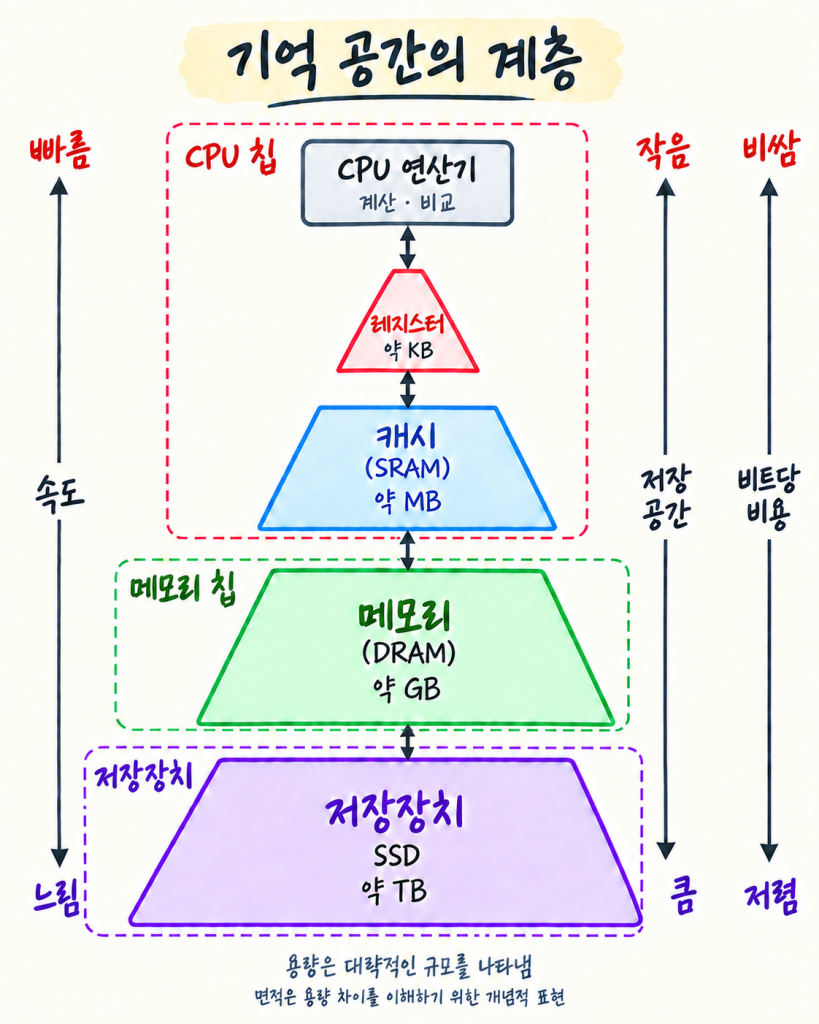
Figure 2-7 arranges the four layers in order of closeness to where computation happens and shows their speed and size together. Let’s go through them one by one, starting from the layer closest to computation.
Registers briefly hold values about to be used in computation, or the results of a computation. They are the fastest but also the smallest.
Cache is where copies of some of the instructions and data in memory are kept close at hand. If the same instruction or data is needed again for a computation, it is taken from the cache instead of going all the way to memory.
Memory holds the instructions and data of the programs currently running. It’s where 3 and 5 — and the instructions to fetch and add them — sat in the previous section.
Storage holds everything, including things not in immediate use, such as installed programs and the documents and photos we’ve created. The first three layers are volatile: their contents vanish when the power is cut. Storage keeps its contents even when the computer is turned off and on again.
The farther a layer is from where computation happens, the slower it gets, but the larger its capacity. It varies by device, but comparing the two extremes, a register delivers a value in less than about a billionth of a second, while an SSD can take tens of thousands of times longer or more.
Two factors work together to create this speed difference. One is distance. Registers and cache inside the CPU are only a short trip away for data, while memory and storage outside the CPU require a longer round trip. The other is structure. The faster a memory space is built to deliver data, the more chip area it takes up to hold the same amount, and the more it costs.
So the fast places can’t simply be made bigger and bigger. Fast space is kept only as small as necessary, while places that must hold a lot of content trade a little speed for large capacity at low cost. Using several layers together is a choice that balances speed, capacity, and cost.
Because memory is layered this way, data is generally found in the nearest lower layer that holds it and pulled up, one layer at a time, toward where computation happens. When a program runs, its instructions and data move up from storage into memory, some of them into cache, and the values needed for immediate computation into registers. Bringing data up doesn’t erase it from the layer it came from; the same data can sit in several layers at once. A computation’s result may stay in a register for use in the next computation, or, if needed, be sent back down and written to memory. To keep that result after the computer is turned off, it must be written to storage. That’s what happens when we press “Save.”
We’ll meet how each of these memory spaces is actually built later, when we look inside the chip. For now, it’s enough to know that memory is divided into several layers, and that the closer a layer is to where computation happens, the faster but smaller it is; the farther away, the slower but larger. Also, while this section used “memory” as the name of the DRAM layer, from here on we’ll use “memory” as the general term for memory spaces, and call each layer by name only when its particular characteristics matter.