2.4 Following a Computer’s Operation Through Tetris
So far, we’ve looked at how a computer follows a program to fetch data, compute on it, and store the results back in memory. In Section 2.1, we noted that it might be hard to imagine how such simple operations lead to vivid game graphics. Now let’s tackle that question with the game of Tetris. Tetris is a relatively simple game, but in it we can see input, computation, memory, and output all working together.
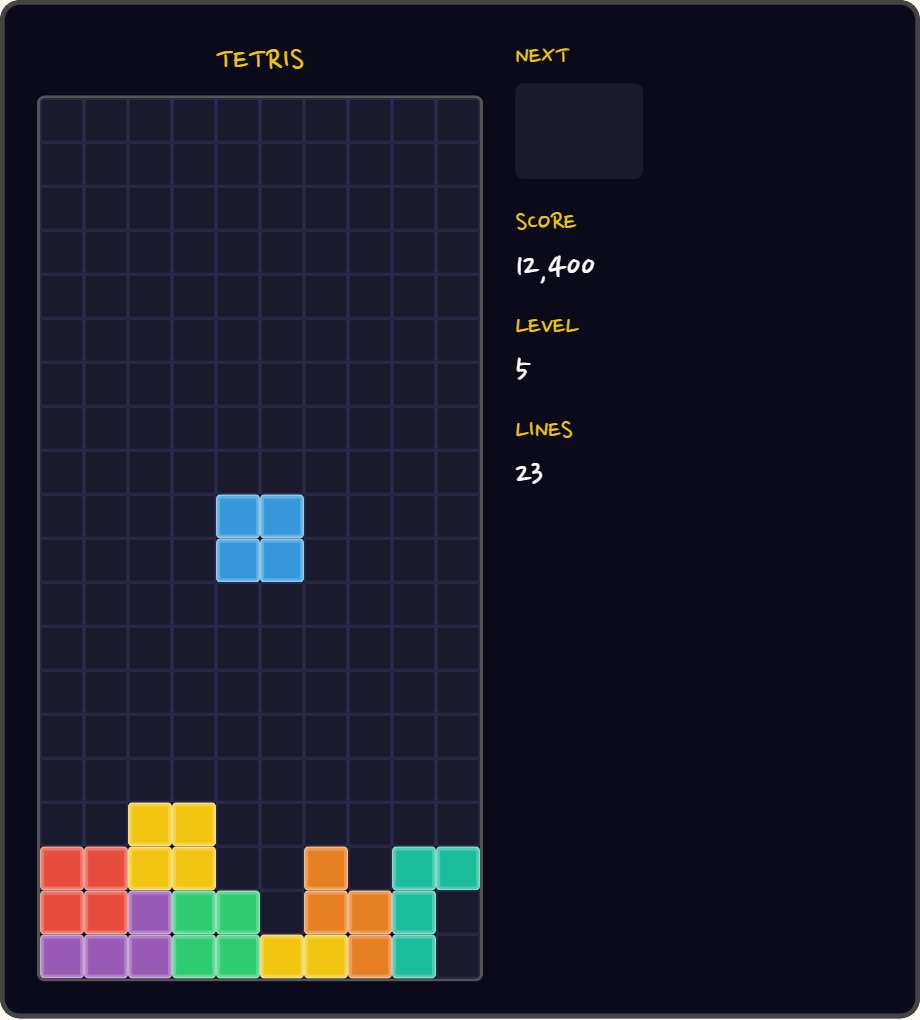
The figure above shows Tetris, known as a classic computer game. Compared with today’s dazzling 3D games, its graphics and behavior are simple, but the fundamental principle behind how Tetris works is no different from that of a flashy 3D game. By what principle can Tetris run on a computer? To put the question another way: if you wanted to make a Tetris program run on a computer, how would you write it?
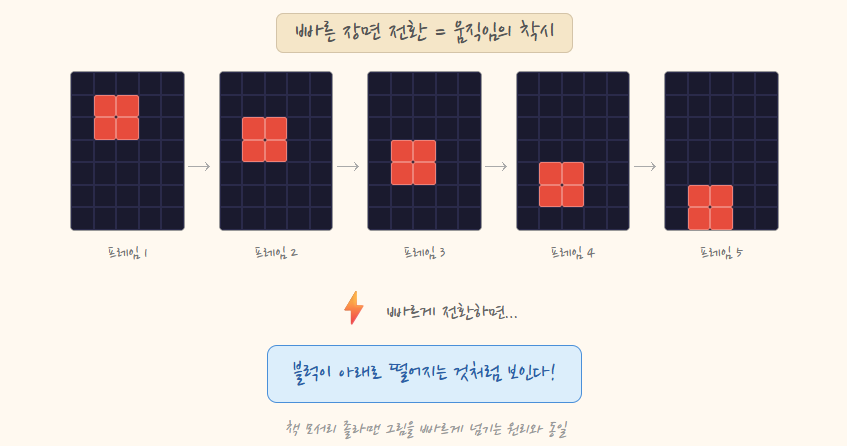
Tetris, like other games, is built on the basic principle of rapid scene changes. When slightly different scenes are shown in quick succession, our eyes perceive a moving picture rather than individual images. Each of these single scenes is called a frame. As a child, you may have drawn a ball bouncing a little higher on the corner of each page of a notebook, then flipped through the pages quickly. Each page on its own is a still picture, but flip them fast and the ball seems to bounce. Every video and film works on the same principle.
Let’s connect this to how a computer works. First, the computer creates the first scene as data, stores it in memory, and shows the scene on the monitor based on that data. Next, it creates data for the second scene — with the block moved down one cell — stores it in memory, and builds and shows that scene on the monitor. Then it does the same for the third scene, the fourth, and so on. If the player has pressed the left arrow key, the data for the next scene simply shows the block moved one cell to the left. When that scene appears on the monitor, we perceive the block as having moved left. The process of showing a scene on the monitor is the same every time; what matters is deciding, through computation, which scene to create. Figure 2-9 shows how slightly different scenes in sequence create motion.
So how does the computer know what to draw in the next scene? Let’s look more concretely at how a single Tetris scene is represented as data, and how that data is changed.
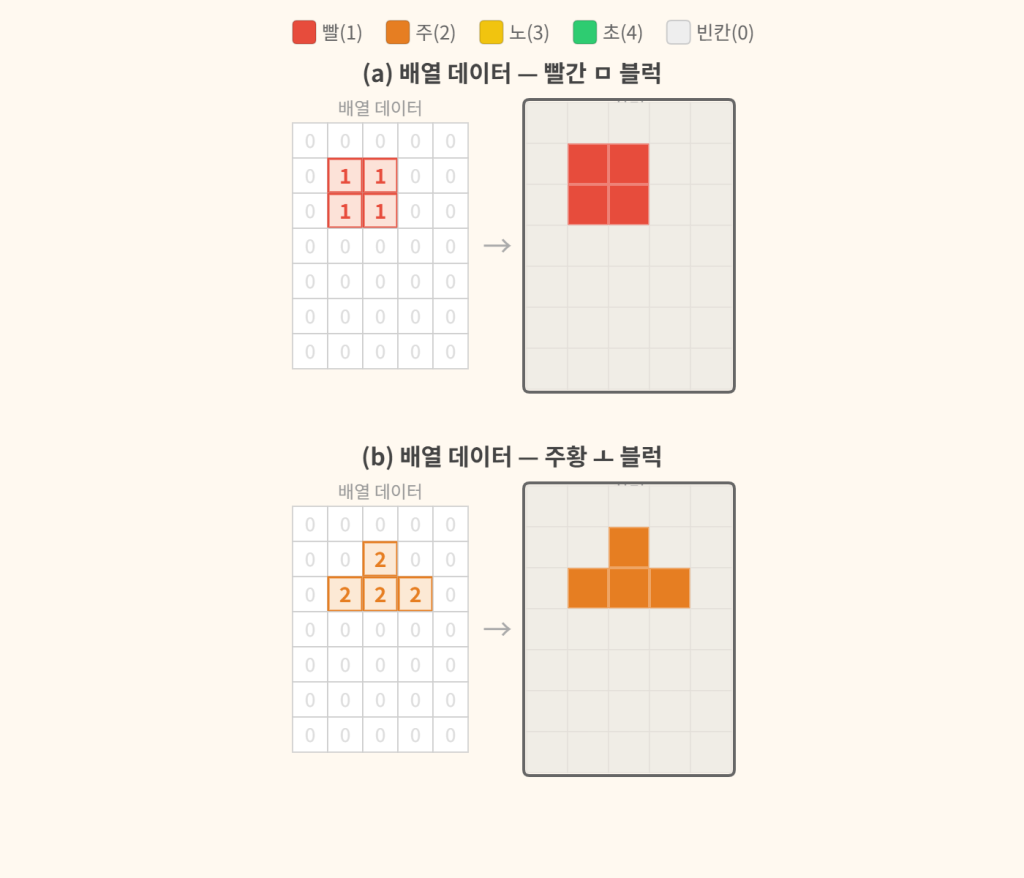
The left side of Figure 2-10 is the data representing one scene of Tetris, and the right side is how that data appears on the actual screen. The data could take many forms, but here we use a 5×7 grid with one number in each cell. Values stored in order, one per cell, like this are called an array. Let’s agree that the number in each cell stands for a color: 0 is empty, 1 is red, 2 is orange, 3 is yellow, and 4 is green. The shape formed by the numbered cells can then represent a block. In the array on the left, the cells containing 1 represent a red square block (a), and the cells containing 2 represent an orange T-shaped block (b). Blocks of other shapes can be represented just as easily. This array data is stored in memory. With the array data, we can determine the color and shape of the blocks to be drawn on screen, and even their positions.
To make the flow of the game easy to follow, we’ll group several small operations together and express them as a single instruction. For example, we’ll treat “draw the screen” as one task, although in reality many smaller instructions work together to carry it out.
Now suppose there is an instruction that draws the screen based on this data (let’s call it paint). When the computer executes paint, it reads the array data in memory and, for each numbered cell, draws a block in the color that number stands for. The resulting screen is the right side of Figure 2-10. In this way, the data stored in memory and the instruction to draw it on screen together produced one scene of Tetris.
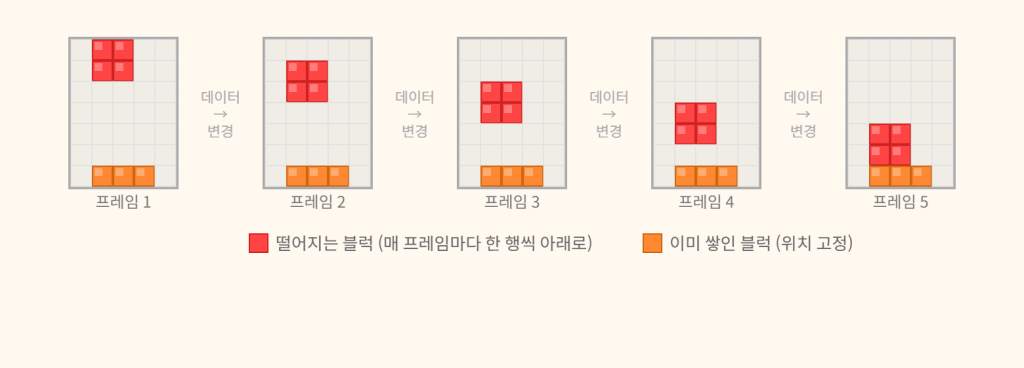
Now that we’ve created a scene of Tetris, it’s time to make the game run. As we saw earlier, a game in action is the repetition of creating a scene, showing it, then creating and showing the next. And each scene is created from data in memory. So if we change the data little by little and, each time, use an instruction to ask for the screen to be drawn, we’ll see a game of Tetris on the monitor with blocks moving. Figure 2-11 shows several scenes created by changing the data in this way.
With this basic knowledge, we can now write an instruction sheet — that is, a program (a set of instructions and the data those instructions work on) — for the computer, and produce a screen on which Tetris runs. Figure 2-12 below shows part of an instruction set for Tetris.
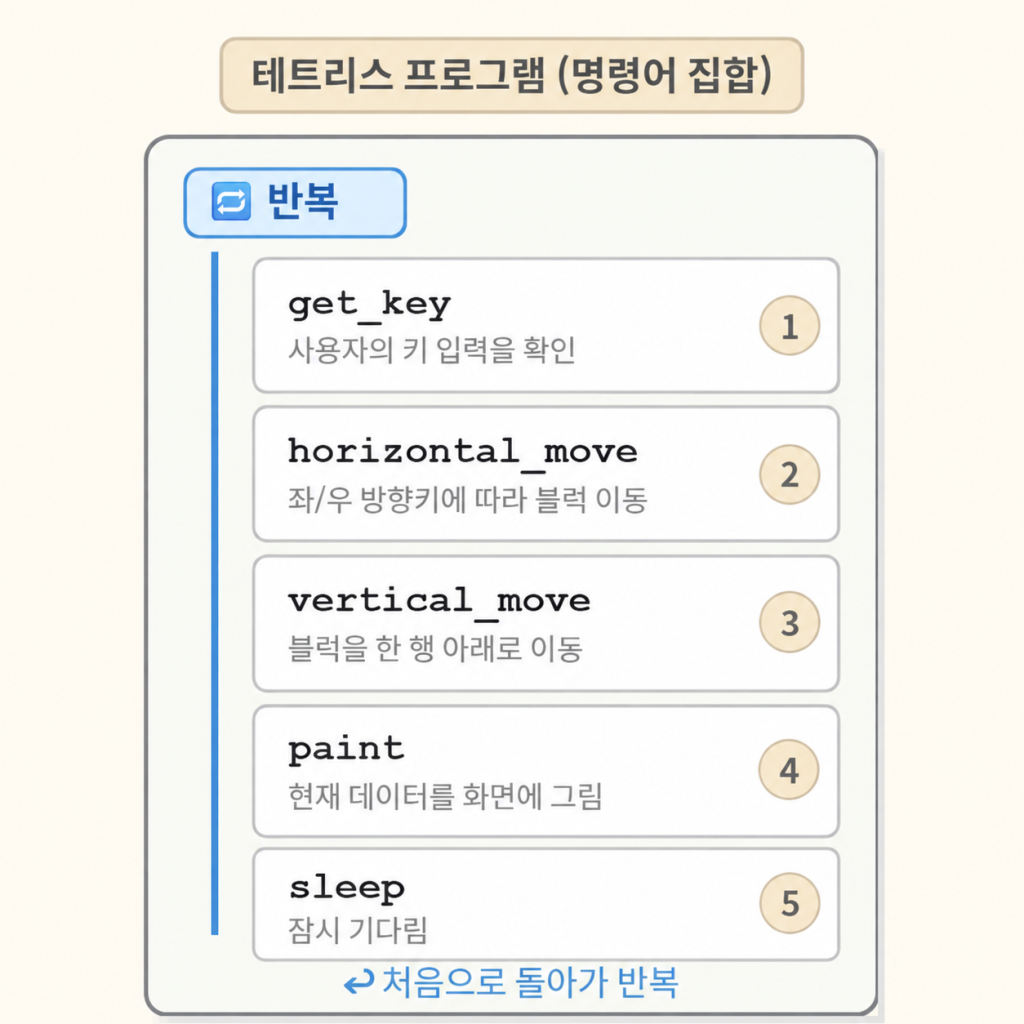
When the program starts, the data representing the red square block we saw in Figure 2-10 is stored in memory. Then the first instruction, get_key, checks whether the player has pressed a key. It doesn’t wait indefinitely for input, though — if it did, the block couldn’t fall in the meantime. It checks for a brief moment: if there is input, it temporarily stores that key value in memory; if not, it records that there was no input and moves on to the next instruction. Now, let’s suppose that when get_key ran, the left arrow key had been pressed.
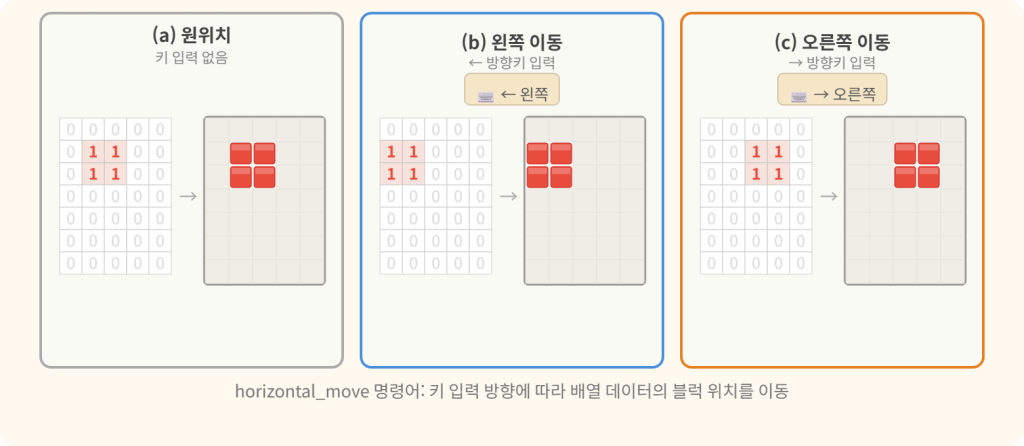
Following the order of the program, the computer next executes the second instruction, horizontal_move. This instruction retrieves the stored key value, checks whether it is left or right, and changes the data so that the moving block shifts one cell in that direction. The cells the block occupied become 0, meaning empty, and the cells it moves into become the number for the block’s color. On screen, the block moves; inside the computer, it’s a computation that works out the new position and changes numbers in memory. In our game, the key value received is left, so the data will change to (b) in Figure 2-13; if the key value had been right, the data would change to the form shown in (c). If the previous instruction hadn’t received any key value, the data would remain as in (a).
Next, the computer executes the third instruction, vertical_move. This instruction changes the data to move the falling block down one row. The method is the same as for moving left or right; only the direction is from top to bottom. As a result, (a) in Figure 2-14 becomes (b).
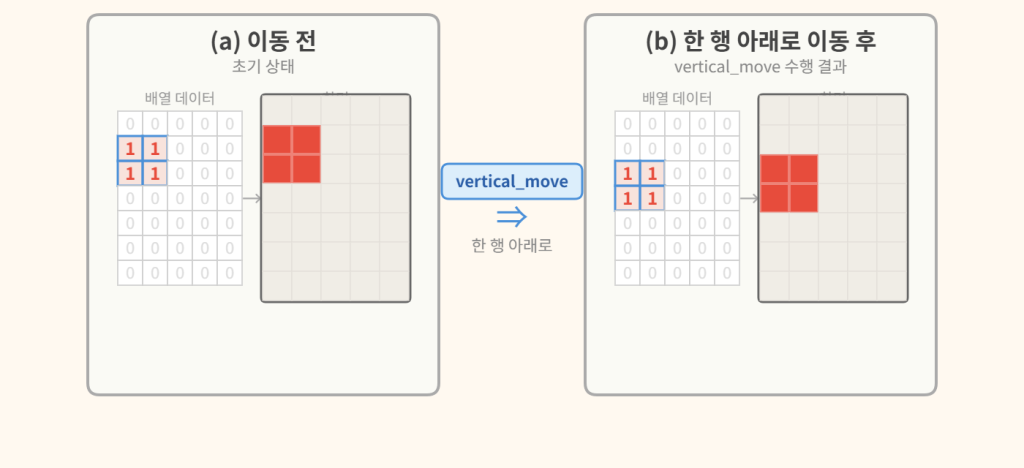
The fourth instruction the computer executes draws the screen based on the array data in memory — in our program, paint. In fact, the instructions before it only changed the array data in memory; they didn’t draw anything on screen. When paint executes, the screen is drawn according to the current data, and as a result, (b) in Figure 2-14 — the final outcome so far — appears on screen.
The fifth instruction is sleep. A computer finishes all of the above in the blink of an eye, so if left as is, the block would appear to plunge to the bottom instantly. That’s why there must be a suitable interval between each step of the block’s descent. The simplest approach is a sleep instruction, meaning “do nothing and wait for a moment,” which briefly pauses before moving on to the next instruction. Real games keep time with more sophisticated methods, but either way, it’s the program that decides how often the block drops.
That’s one full cycle. The program then returns to the first instruction, get_key, and repeats the same sequence from the beginning (all it takes is one more instruction in the list that says “go back to the start”). As this cycle repeats over and over, we get a block that falls while moving left or right according to the player’s key presses.
In the same way, it isn’t hard to make an orange T-shaped block fall instead of a red square one. Of course, this alone doesn’t make a real game of Tetris. A block must stop and stack up when it touches the bottom or another block, and a row must be cleared when it fills up. To add these behaviors, what data would need to be checked, and what additional instructions would be needed? Try to imagine it.
So far, using Tetris as an example, we’ve had a computer follow a program to create a screen with moving blocks. Looking back, that single cycle contains all four basic operations from Section 2.1: get_key is input, horizontal_move and vertical_move are computation, the array in memory is memory, and paint is output. We’ve been describing a game, but what you should really take away is the fundamental way a computer works, hidden behind it. Tetris, too, is ultimately the rapid repetition of taking data from memory, computing on it according to an instruction sheet, and storing the result back in memory. I hope this example has given you a fuller understanding of how a computer is structured and how it operates.
Keep in mind the basic way a computer works that we’ve explored so far — and now let’s find out how these operations take place inside a chip.