2.2 A Computer That Follows Its Instruction Sheet
In the previous section, we looked at the big picture: a computer processes data in memory according to a program. This time, let’s see which components actually divide up that work, and follow the process by which a single simple addition is carried out. A few technical terms will appear, but there’s no need to worry. We’ll simply confirm, one concrete example at a time, the principle we’ve already seen.
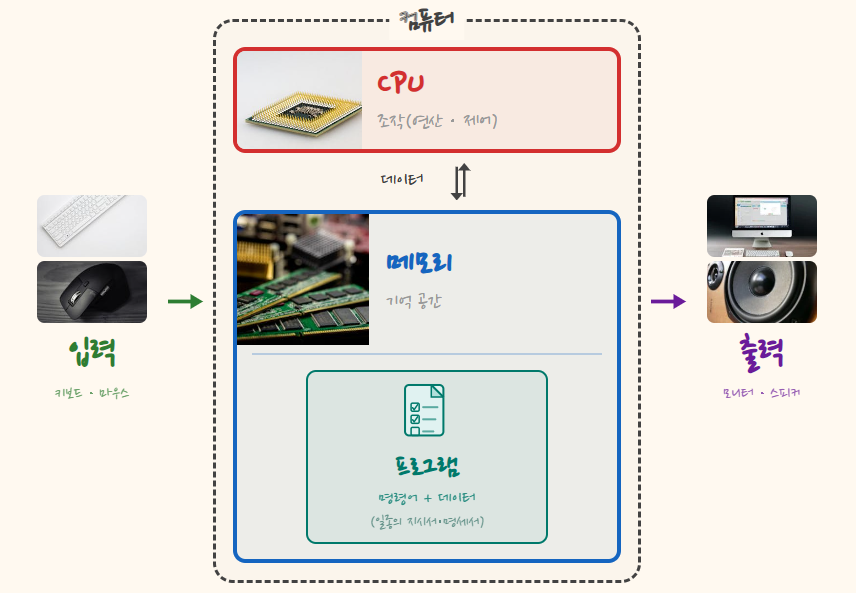
We’ll revisit the four operations from the previous section — input, computation, memory, and output — this time together with the devices that handle them. We’ll start with input and output, which face the outside world, then move inward to memory and computation. On top of these, we need a program that tells the computer what to do. Let’s look at each in turn.
Input and output are how a computer exchanges information with the outside world. Input brings information from outside into the computer. On a typical computer, the keyboard and mouse are the classic examples, but the touchscreen on a smartphone or tablet, a joystick, and all kinds of sensors are input devices too. When you press a key on the keyboard, an electrical signal indicating which key was pressed is sent into the computer. Output works the other way, sending processed results out. Output devices include not only screens that display text and images, like a monitor or a smartphone display, but also devices that create motion, like a robot arm or a motor, and devices that indicate status, like an LED signal light. Following signals from the computer, they change what’s on the screen or move physical devices, so that we can see the result.
If input and output are the windows where the computer meets the outside world, the places where the real work happens inside the computer are the other two: computation and memory.
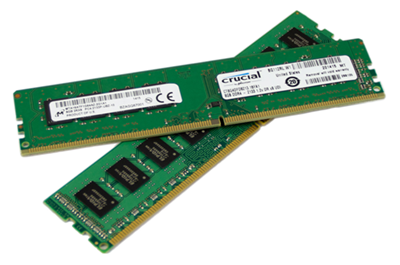
Memory holds the data needed while work is being processed — numbers to be used in a calculation, the contents of a document being written, the position of a character in a game. The device that holds such data and lets it be read or replaced with new values when needed is called memory. Inside a computer, this role is played by DRAM (Dynamic Random Access Memory) chips — what the previous chapter called chips that remember (memory semiconductors). Figure 2-2 shows what memory actually looks like.
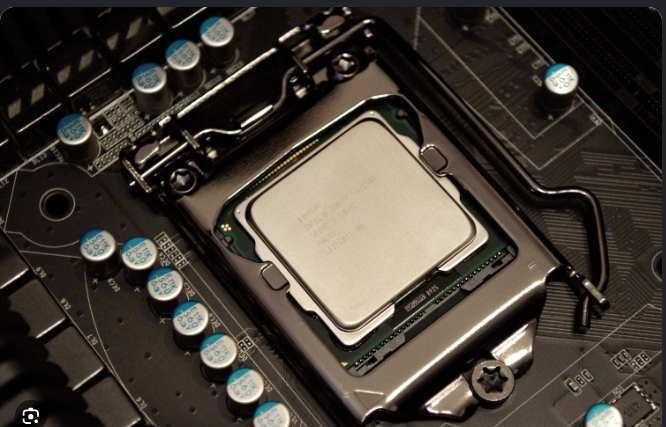
Last comes computation: the operation that actually processes stored data, calculating and comparing values. Adding newly earned points to your existing score in a game, or checking whether that score has reached a target, are examples of computation. The chip that does this is the CPU — exactly the kind of chip the previous chapter called a chip that computes (a system semiconductor). Figure 2-3 shows what a CPU actually looks like.
The two kinds of chips we distinguished by role in the previous chapter have now each found their place. These devices work together, exchanging data with memory at the center. One more thing: the way they exchange information is always based on electrical signals. Writing data to memory and reading it back are done electrically, too. It’s fine if you can’t picture exactly what that looks like yet; its meaning will become clear as you read on. Figure 2-4 shows these relationships mapped onto real components.
Now let’s take a closer look at the program we’ve been talking about.
A program is like a document handed to the computer listing what it should do. Think of a work order in a factory. It doesn’t just say what to make and in what order; the materials needed for the job come along with it. The program a computer receives is the same.
A program contains two things. One is instructions, which describe the work the computer will perform. The other is data, which the work will use. To add two numbers, you need not only the instruction “add the two values” but also the two numbers to add. The instruction to add is the instruction; the numbers to be added are the data.
When a computer runs a program, the instructions and data are actually stored in memory beforehand. The CPU, which handles computation, fetches instructions from memory one at a time and decodes what it is being asked to do. Then, following each instruction, it fetches the data it needs or performs a computation, and stores the result back in memory. By continuing this cycle, the computer carries out the work written in the program.
For example, suppose we have a program to calculate 3 + 5. Here we’ll simplify the execution process so the basic principle is easy to follow. Memory holds the instructions for this calculation and the two values to be calculated, 3 and 5. What instructions does the CPU need to carry out this calculation? Even for a single 3 + 5, there are many possible ways to break it into instructions. Let’s consider the simplest one.
First, we need an instruction that brings data from memory into the CPU (LOAD). Next, we need an instruction that adds two values inside the CPU (ADD), and finally an instruction that stores the result in memory (STORE). That’s three kinds of instructions, but since LOAD must run twice — once for 3 and once for 5 — four instructions are actually executed.
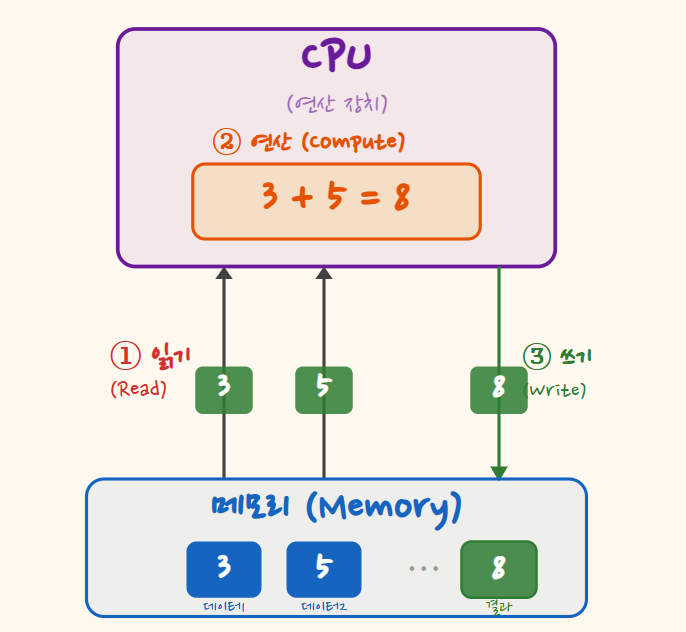
Let’s look more closely. To find out what it should do, the CPU first fetches the first instruction from memory. Decoding it, the CPU learns that it is a LOAD instruction telling it to bring the data value 3 from memory into the CPU. A LOAD instruction specifies where to fetch the data from and where inside the CPU to put it. Following this instruction, the CPU reads 3 from memory and holds it internally. The CPU, too, has a small memory space of its own for briefly holding values used in computation and their results.
Note that fetching an instruction and fetching data are distinct. Fetching the instruction is the step of finding out “what to do.” Fetching the data value 3 is the step of actually carrying out what that instruction asked for. Both involve bringing something from memory, but for different purposes.
Having finished the first instruction, the CPU fetches and decodes the next one from memory. The second instruction is also a LOAD, this time telling it to bring 5 into the CPU. After this instruction, both 3 and 5 — the values for the addition — are inside the CPU. Now it’s ready to do the actual addition.
The CPU fetches the third instruction from memory. This time it is an ADD instruction, which adds two values. The CPU adds the 3 and 5 it is holding and briefly keeps the result, 8, inside the CPU. The result has not yet been stored in memory.
Finally, the CPU fetches the fourth instruction, STORE. STORE is an instruction that moves a value from inside the CPU out to memory. When the CPU executes it, 8 — the result of 3 + 5 — is stored in memory. Showing this result on a monitor would require additional processing to display it on screen, but here we’ve followed the process up to storing the calculated result in memory.
What if we also needed to subtract 2? How would the program change? Try to imagine what additional data would need to be fetched and what operation would need to be performed.
So far, we’ve used the example of calculating 3 + 5 to look at the core operation of a computer. The program contained the computer’s work in the form of instructions, and those instructions, along with the data to be calculated, were in memory. The CPU fetched and decoded the instructions in order, fetched data and computed as instructed, and stored the result back in memory. This is how the idea from the previous section — “processing data in memory according to a program” — actually plays out.
This basic exchange between the CPU and memory repeats in even the most complex programs we’ll look at later. However many instructions and data there are, and however complicated the order of processing becomes, the process we’ve just seen lies underneath. Writing a document, drawing a game screen, running an AI model — look inside, and each is a repetition of these back-and-forth steps between two kinds of chips.
So far, though, we’ve mostly described a single memory space called “memory,” and only mentioned that the CPU also has a place to hold values briefly. A real computer has several memory spaces like these, each with a different role and characteristics. In the next section, let’s look at why these spaces are separated and how they are used together.