2.1 The Big Picture of What a Computer Does
Let’s look at the forest first. Grasping the overall shape before examining the details makes it easier to see where each thing we learn later fits and how it all connects. We begin with the first stage described in the previous chapter: sketching the big picture of how a computer works.
The chips we looked at in the previous chapter are parts of a larger system, the computer, and each plays a specific role within it. So to understand how chips carry out the work we give them in code, we first need to understand how the computer works as a whole — which components take on which roles, and how they cooperate. That is why, before talking about specific operations, we’ll start with the overall structure and operation of the computer, even if it feels a little abstract.
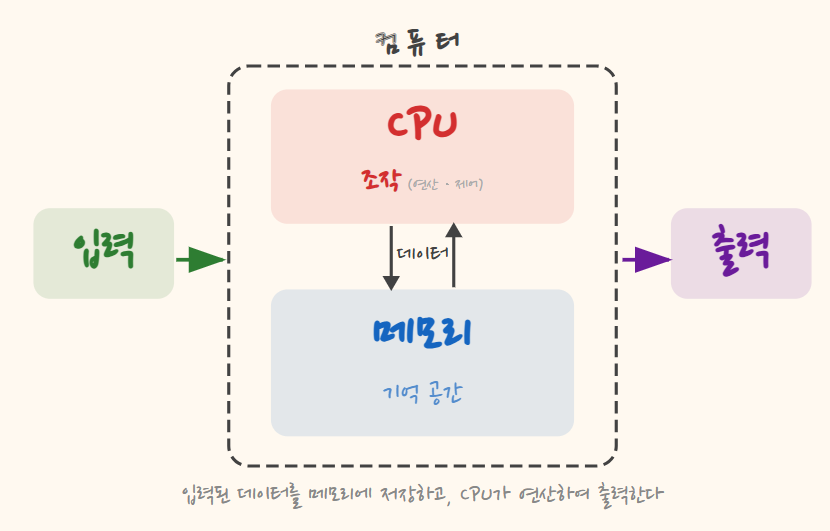
As we saw in the previous chapter, a computer’s basic operations are four: input, computation, memory, and output. Computation here covers not only arithmetic, such as adding or subtracting numbers, but also comparing two values. Memory means holding the information used for that work and its results. Information means anything a computer handles — numbers, text, photos — and we call it data.
Of these four, the places where a computer actually gets work done are computation and memory. Broadly speaking, what a computer does is read data from memory, compute on it, and store the needed results back in memory. To compute, it must have the data in memory, and the results must be stored again so they can be used later. The two turn together like interlocking gears. Input puts data into memory, and output takes results from memory and presents them. Both are indispensable, but they are closer to windows facing the outside world. As mentioned in the previous chapter, computation and memory are what this book follows.
Yet a computer is quite passive. To get it to do what we want, we have to tell it what data to fetch, what to compute, and how to use the results. In the previous chapter, we said that what spells this out is a program. From the computer’s point of view, it is a kind of instruction sheet: it states what to do and in what order, along with the materials to use. Programs are written in code, and the computer follows the methods and order on this instruction sheet to read data from memory, compute on it, and produce output. It may repeat the same work, or what it does next may depend on a condition — but even those repetitions and forks in the road are written on the instruction sheet.
Seen this way, a computer’s basic operation is quite simple: it takes data from memory, computes on it according to an instruction sheet, and stores the result back in memory. This is the core of how a computer works, and it is chips that carry it out. This basic operation is the starting point for all the complex computer behavior we’ll examine from here on, so please keep it firmly in mind.
But the computers we actually use look far more complex and dazzling than this description suggests. We can open several windows and do many things at once, and game graphics can be so realistic they are hard to tell from reality. Computers also connect to the internet and exchange information with other computers.
Can all of this really come from a computer that performs only the simple basic operations described above — input, computation, memory, and output? It may be hard to imagine how merely calculating numbers and remembering the results leads to vivid game graphics and internet communication. In this book, we’ll connect the dots one by one and come to understand how simple basic operations add up to complex work.
It’s fine if this hasn’t fully clicked yet. You’ll meet the same principle again, in more concrete form, in the next section.