1.2 Chips That Compute and Remember
In the previous section, we saw that using advanced AI models required a high level of computing power, and that advances in chips made it possible. Now let’s turn our attention inside the computer and get to know the chips there a little better.
Computers do all sorts of things: writing documents, showing photos, solving complex problems. Underneath all of this are four basic operations: input, taking in information from outside; computation, processing that information; memory, holding the information needed for processing along with its results; and output, sending the results back out. Computation includes arithmetic, such as adding and subtracting numbers, and comparison, such as weighing one value against another. For a computer to do anything, these operations have to work in concert. For example, to have code add two numbers, the computer must receive and remember the numbers, actually add them, and send out the result. Of these, this book mainly follows computation and memory. Input and output are the windows through which information is exchanged with the outside world, while computation and memory are where the work instructed by code is actually carried out.
Inside a computer are small electronic components, chips, that take on this computation and memory. Many kinds of chips are connected and work together, cooperating with various other components, and together they make up a computer.
If we classify chips by their main role, those that compute or control operations are called system semiconductor chips, and those that remember and store information are called memory semiconductor chips. Figure 1-2 shows this classification by role. The name “semiconductor” comes from the material chips are made of; why that material is used to make chips is something we’ll explore in detail later.
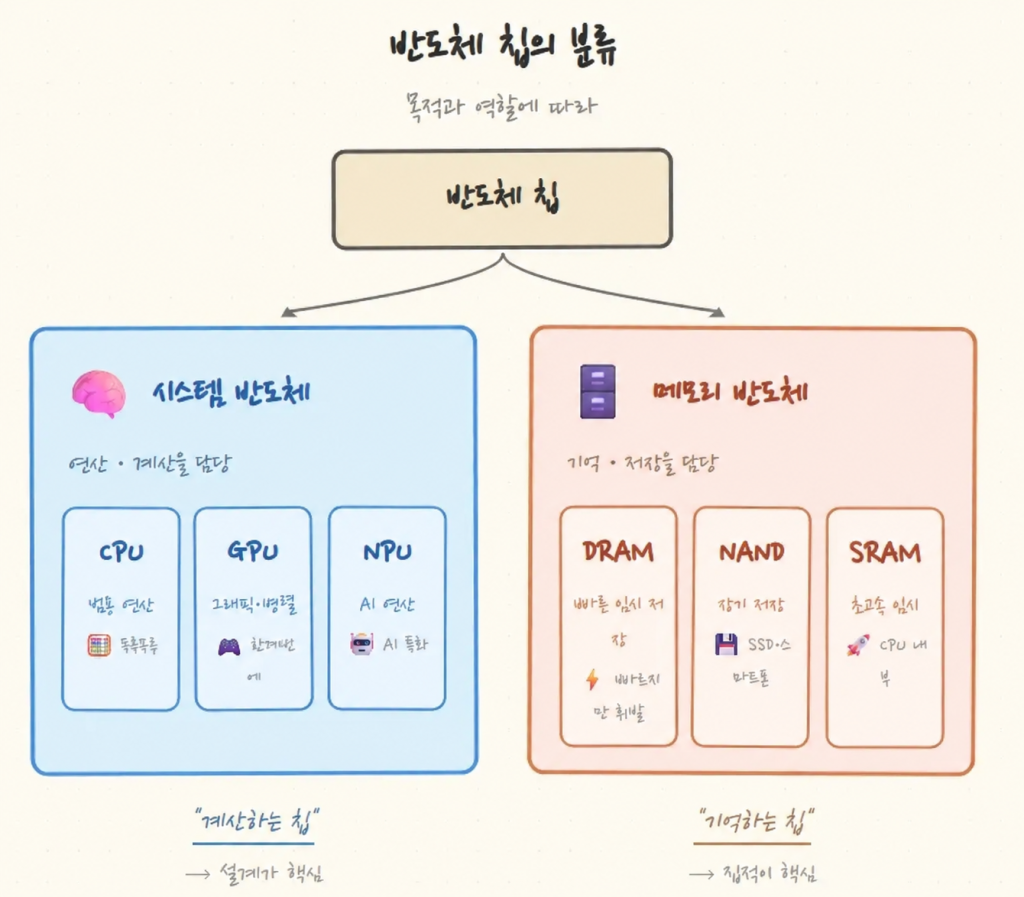
First, the CPU, GPU, and NPU are representative system semiconductor chips. The CPU (Central Processing Unit) is the chip that runs many kinds of programs and handles a wide variety of work. Beyond performing computation, it reads a program’s instructions in order and directs each part of the computer to act at the right moment. The Intel and AMD chips in laptops and desktops belong to this category.
The GPU (Graphics Processing Unit), as its name suggests, was originally built to draw images on the screen, but its strength in handling many operations at once turned out to suit AI computation as well, and today it is widely used for both. NVIDIA’s chips are the best-known example.
The NPU (Neural Processing Unit) is a chip built for the special purpose of efficiently processing the artificial neural network computation we saw in the previous section.
Representative memory semiconductors are DRAM and NAND flash. DRAM holds the information a running program needs so it can be fetched quickly, but its contents vanish when the power goes off. NAND flash keeps information even with the power off, so it is used to store documents and photos. One is fast but forgets; the other is slower but remembers — and a computer uses both kinds of memory chips together, as needed.
Although we have broadly divided chips into system semiconductors and memory semiconductors, computation and memory are not always split across different chips. A single chip can contain both a part that computes and a part that stores information. The distinction between system and memory semiconductors simply reflects which role a chip mainly plays. However it is organized, a computer can run a program only when the parts that compute and the parts that remember exchange information and work together.
Even within the broad categories of system and memory semiconductors, chips are further divided by the work they do — the CPU, GPU, NPU, DRAM, and NAND flash we just looked at are examples. That is because different purposes call for different designs. There is a limit to how much circuitry can fit on a chip, so once you decide what it should be good at, its internal structure is shaped accordingly. It’s like a specialist who has drilled one kind of calculation being far faster at it than a generalist who does a bit of everything. Here, the generalist is the CPU, and the specialist is a chip like the NPU.
So far, we have looked at the kinds of chips that make up the inside of a computer — a key part of understanding the world beneath the code — and briefly at why so many kinds of chips exist. In this book, we will center on the CPU and follow how it processes a program’s instructions, seeing how computation and memory are carried out across multiple chips and how they are connected. In the next section, we’ll look at the many forms of computers built from chips that surround us.